

Ingredients:
- All purpose flour (Maida) - 1 cup
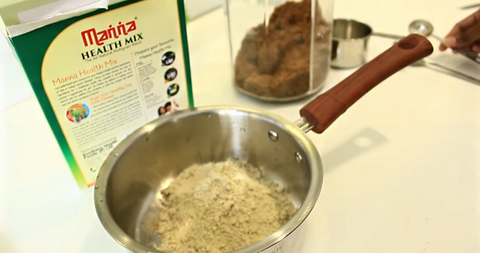
- Health mix roasted grain ground into fine powder – 1 Cup
- Butter/Ghee - 3/4 cup (at room temp.)
- Chilly powder - 1 tsp
- Ginger - 1" piece (minced)
- Cumin seeds - 1 tsp
- Green/Dry red Chillies - 1 or 2 (minced)
- Curry leaves - 2 strands (minced)
- Baking Soda - 1/2 tsp
- Asaefoetida - A pinch
- Salt - 1/2 tsp ( or to taste)
- Sugar - 2 tsp
Method:
- Mix all the above ingredients together in a bowl to get nice dough like chappatti dough.
- If the dough is not moist enough add 2-3 tblsp of curd.
- Grease an aluminium foil and roll out the dough into a big circle 1 "thick.
- Using a cookie cutter or any bottle lid, cut out into desired cookie shapes.
- Place the cut out cookies on a greased baking dish and bake it for 15 - 20 minutes in an oven preheated to 160 degrees celcius.
- Cool and store in air tight containers and enjoy for many days.

Comments (11010)
ngl Bhai Onlinecasino slaps fr fr, the whole vibe is lowkey fire and payouts r actually pretty solid imo
666okwin
+ Clean, modern design
+ Fast withdrawals
+ Good customer support
+ Tons of game variety
+ No hidden fees nonsense
canadian pharmacy world reviews: US Meds Saver – 77 canadian pharmacy
Типография «повсюду» предлагает полный спектр полиграфических услуг в москве — от визиток и листовок до сувенирной продукции и наружной рекламы. Современное оборудование позволяет выполнять заказы любой сложности в кратчайшие сроки с гарантией качества. Ищете оригинальные корпоративные подарки? Заказать печать можно на сайте povsyoudo.ru, где представлен полный каталог услуг с расчетом стоимости. Компания работает с индивидуальными макетами, предоставляет услуги дизайнера и доставку готовой продукции по москве и области.
Honestly I was skeptical at first cuz these sites can be hit or miss but I was actualy pleasantly surprised by how professional everything runs here, the whole experience has been better than expected and im kind of a hard person to impress. royal cas
Компания Arust реализует всесторонние сервисы по выбору и обслуживанию договоров с объектами жилой недвижимости в Ставропольском регионе. Специалисты компании проводят юридическую проверку объектов, готовят документацию, контролируют процесс купли-продажи и гарантируют безопасность транзакций. Ищете юридическая проверка квартиры перед покупкой? Актуальные предложения представлены на ar26.ru с детальными характеристиками. Коллектив специалистов ведет дела с первичным и вторичным жильем, информирует о семейных и субсидированных кредитах, освещает изменения в жилищном праве и отстаивает права заказчиков в течение всего цикла.
ngl this place is kinda fire lowkey, the variety is insane and the payouts actually seem legit fr fr, plus the app interface is clean asf and runs smooth on my phone, would reccomend if ur looking for something new tbh babu88 ?
https://usmedssaver.shop/# script pharmacy
rufus Rufus is known as a lightweight, no-cost, open-source utility designed to make bootable USB drives. It is used to prepare a USB flash drive that can install an operating system, launch diagnostic tools, or start a recovery environment. The program requires no installation and can be run as soon as it is downloaded.
The primary purpose of Rufus is to create bootable USB media from ISO images fast and reliably. This lets people install or run operating systems directly from a USB flash drive without the need for DVDs. The tool supports a broad selection of operating systems and service utilities, which makes the program useful for both regular users and system administrators.
Rufus runs on computers with Microsoft Windows, starting from Windows 7. Both 32-bit and 64-bit versions are supported, and there is also a version available for ARM64 architecture.
The software lets users create bootable USB drives from many different ISO images. It can be used to prepare a USB drive for installing Windows 11, Windows 10, Windows 8.1, or Windows 7, as well as various Linux distributions. Rufus also works with DOS systems and other recovery or maintenance tools commonly used for troubleshooting computers.
One of the included features of Rufus is the ability to download official Windows ISO images directly from Microsoft servers. This allows users to obtain original installation images for Windows 8.1, Windows 10, and Windows 11 without searching for them on third-party websites.
In addition to creating bootable drives, Rufus can format USB devices. It supports several file systems including FAT32, NTFS, exFAT, UDF, and ReFS. This flexibility allows the USB drive to be prepared for different use cases and compatibility requirements.
Rufus supports both legacy BIOS systems and modern UEFI environments. Because of this, bootable drives created with Rufus can work on older computers as well as newer systems that use UEFI and Secure Boot.
Another feature included in Rufus is Windows To Go support. This option allows users to run a full Windows environment directly from a USB drive. It can be useful for testing systems, performing maintenance, or working on multiple computers without installing Windows on the internal drive.
Rufus also provides the option to bypass certain Windows 11 installation requirements. When creating an installation USB, the program can disable checks for TPM 2.0, Secure Boot, and minimum RAM requirements. This makes it possible to install Windows 11 on computers that would otherwise not meet the official hardware requirements.
One of the reasons Rufus has become popular is its speed and simplicity. The program is extremely small, about 1.9 MB in size, and runs as a portable application without installation. It is distributed under the GPL v3 open-source license, supports more than 70 languages, and contains no advertisements, bundled software, or tracking components.
Rufus works with a large number of ISO images. These include multiple versions of Windows, Windows Server editions, FreeDOS, and various system tools such as GParted, Hiren’s Boot CD, Parted Magic, and Clonezilla. Because of this wide compatibility, the program can be used not only for installing operating systems but also for disk management, data recovery, and system maintenance tasks.
To use Rufus, a computer running Windows 7 or later and a USB flash drive are required. The program does not need to be installed. Users simply download the executable file, run it, select the ISO image they want to use, and create a bootable USB drive. Due to its simplicity, speed, and reliability, Rufus remains one of the most widely used tools for creating bootable USB drives.
http://bajarxdirect.com/# best pharmacy in mexico